





3.8
Free
Free SD Card Data Recovery
Free SD Card for Data Recovery and Storage
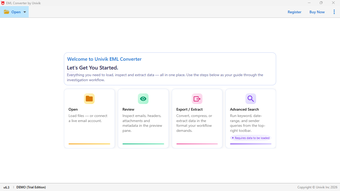
Univik EML Converter is a dedicated desktop utility designed to help users manage and transform mailbox data stored in EML format. Email messages saved as EML files are commonly generated by many email clients, but they may not always be easily accessible or compatible across different platforms. This software offers a structured method to convert EML files into other widely used formats while preserving message integrity.
The program maintains the original content of each email, including attachments, metadata, and formatting. It ensures that message details such as sender information, timestamps, and subject lines remain intact during the conversion process. With an intuitive interface and step-by-step workflow, the application can be used by both technical professionals and general users.
The software allows users to load individual or multiple EML files and convert them into different formats for migration, backup, or archiving purposes. This makes it easier to move email data between platforms or maintain organized records of communication.
During the conversion process, the software preserves the folder structure and keeps email properties unchanged to ensure reliable results.
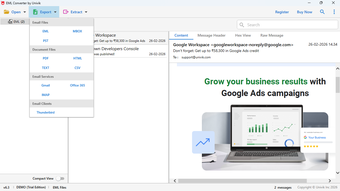
Convert EML files into multiple supported formats
Preserve attachments, headers, and metadata
Maintain original folder hierarchy and email formatting
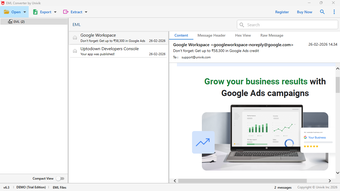
Preview email content before conversion
Batch processing support for multiple EML files
Simple interface suitable for beginners and professionals
Install and launch the software on your system.
Add the EML files you want to convert.
Preview the email content within the application interface.
Choose the desired output format.
Select the destination location and start the conversion process.
Improved support for large email files
Enhanced stability during batch conversions
Better preservation of attachments and message properties
Minor interface enhancements for smoother operation
Operating System: Windows 11, 10, 8.1, 8, 7RAM: Minimum 2 GB recommendedHard Disk Space: At least 100 MB of free space
The demo edition allows users to test the software with limited conversion capability. Upgrading to the licensed version unlocks full features and unrestricted conversions.
Demo
6.3.0
Windows
Windows 2003
English
1
53.65 MB

Have you tried Univik EML Converter? Be the first to leave your opinion!
Add reviewFree SD Card for Data Recovery and Storage

An app for recovering lost mobile content

A powerful data recovery software for Apple devices on Windows

A Powerful PC System Recovery Tool

A Versatile Tool That Helps Recover All Kinds of iCloud Data

Recover deleted or lost data for iPhone, iPad, iPod touch from device, iTunes or iCloud backup

PanFone Data Recovery: Windows Data Recovery Program

Picture Recovery Software for USB Media

BLR Data Recovery Tool New Software
Free Hard Drive Data Recovery

Undelete files and recover lost data in a few clicks.
.png)
Convert Outlook PST Data into EML Format with Ease